
Investigation and evidence
Investigation keeps one failure group fixed while you examine its concrete occurrences. The diagnosis is a claim to verify, not an instruction to accept automatically.
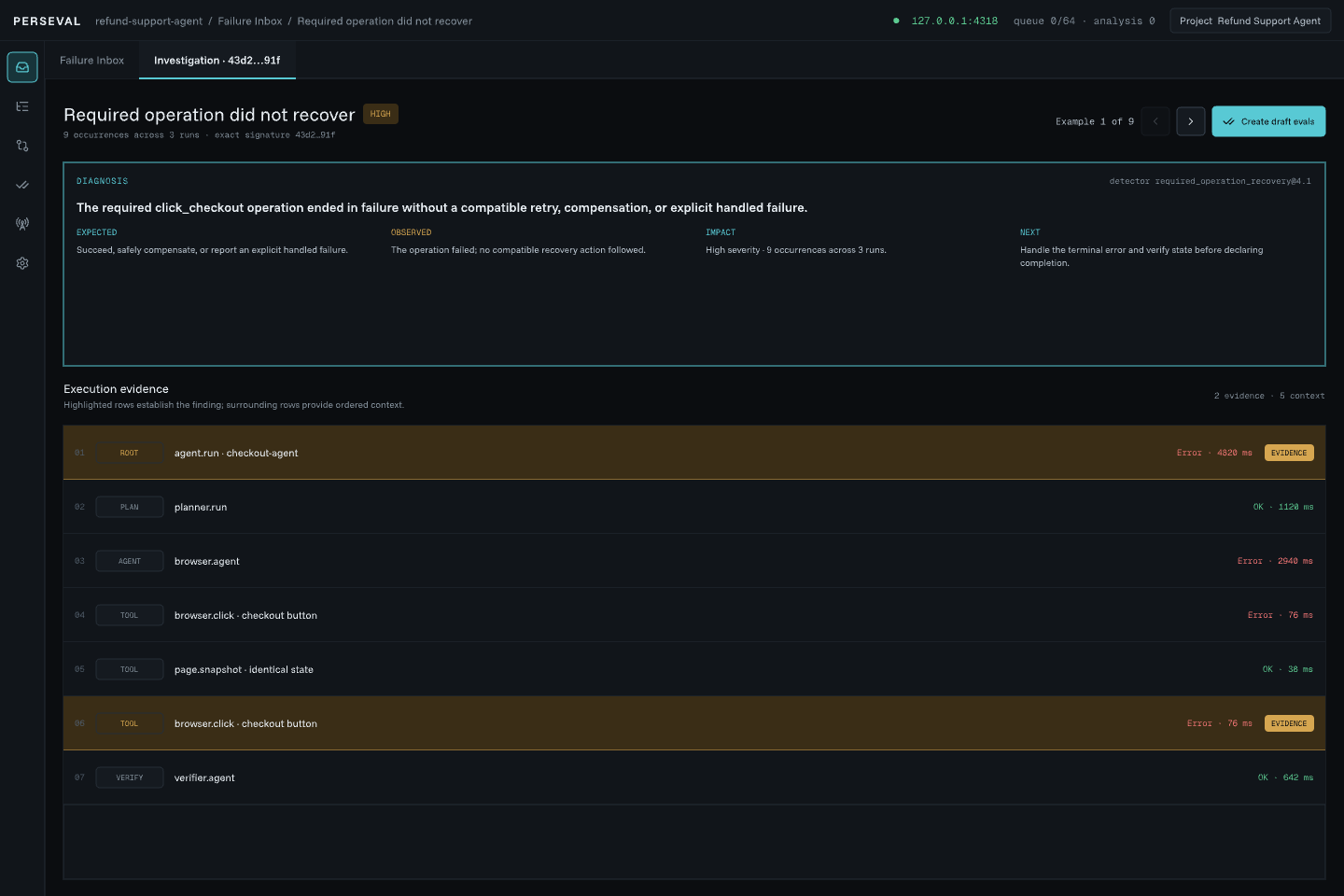
What the screen contains
Section titled “What the screen contains”- diagnosis;
- expected and observed behavior;
- impact and recovery summary;
- remediation hint and caveats;
- ordered evidence spans;
- bounded surrounding execution context;
- certainty, missing facts, detector version, and provenance;
- pinned review and eval actions.
Long evidence no longer pushes the primary actions out of reach. Detailed attributes and payloads remain in the optional inspector.
Previous and Next
Section titled “Previous and Next”Previous and Next move between occurrences in the same exact group. The current position is shown as “Example N of M.”
- Previous is disabled on the first example.
- Next is disabled on the last example.
- Both are disabled for a one-example group.
Navigation crosses bounded pages without clearing the current evidence when a transient page load fails. Use Retry if a recoverable load message appears.
To exercise this flow with the public fixture, send one scenario with distinct identities, for example --scenario uncertain-mutation --occurrences 3. Sending the default stable identity repeatedly updates or reopens one logical trace; it does not manufacture duplicate examples.
Evidence roles
Section titled “Evidence roles”Evidence is ordered and labeled by its role in the diagnosis, such as error, recovery, verification, state change, or context. Selecting an item synchronizes the trace selection and inspector.
Telemetry-gap identities are summarized for readability; immutable evidence packets retain exact references.
Review a claim
Section titled “Review a claim”Before confirming a finding:
- check whether the operation was required;
- distinguish read-only work from a mutation;
- verify retry safety rather than assuming it;
- inspect state observation or compensation;
- compare root outcome with the cited evidence;
- check detector version and missing facts.
Use Needs context when the trace cannot support a safe decision. Dismiss a false positive rather than changing telemetry to hide it.
Open Full Trace
Section titled “Open Full Trace”Use Full Trace when bounded context is insufficient. Perseval highlights the evidence spans, preserves the selected agent/span, and keeps a return origin. Back to investigation restores the exact group and example rather than opening a generic Inbox.
Create an eval
Section titled “Create an eval”Create a candidate from one verified occurrence or return to the Inbox for bulk creation. Candidate creation does not execute the eval or change agent code.