
Workspaces and identity
Perseval can debug many local projects without merging their evidence. The hierarchy is intentional:
| Boundary | What it means | Example |
|---|---|---|
| Workspace | One local storage and configuration boundary | your default laptop workspace |
| Project | One agent application or repository | checkout-agent |
| Environment | Where a run executed | local, staging, production |
| Build | Code, prompt, model, or configuration version | git-a61c2e1 |
| Session | Related runs in one user or task conversation | checkout-incident-42 |
| Run | One logical agent execution | one attempt to process a return |
| Revision | Immutable finalized view of a run | revision 1, then reopened revision 2 |
| Agent | Stable participant identity | policy-agent |
| Role | Responsibility in this execution | planner, browser, verifier |
Workspace versus project
Section titled “Workspace versus project”Use projects for ordinary separation between applications, repositories, or teams. Use another workspace only when you need a separate local trust, storage, or retention boundary.
The GUI opens the platform-default persisted workspace. Settings → Workspace shows the effective path and whether an environment override selected it. PERSEVAL_WORKSPACE_DIR is an advanced launch override, not a required first-run step.
Project routing
Section titled “Project routing”Every imported or streamed trace belongs to an explicit project. Copy the exact perseval.project.id=<id> value from Sources and attach it as an OpenTelemetry resource attribute.
File import also asks for a project. All-project scope is read-only for actions such as finding review and eval creation; choose one project before mutating review state.
Switch projects
Section titled “Switch projects”Use the Project control in the upper-right workbench header. The menu shows every project in the workspace and keeps the active project visible at all times.
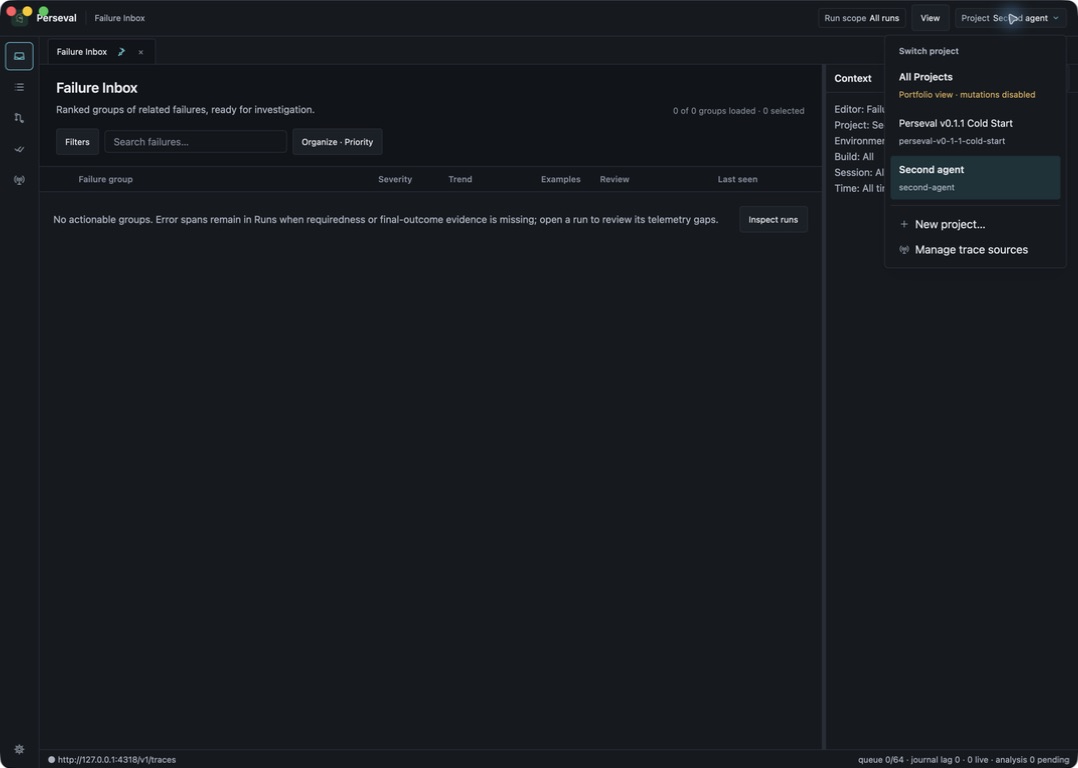
- Choose a project to restore its filters and last useful editor context.
- Choose All Projects for a read-only portfolio view across the workspace.
- Choose New project… to open project creation in Sources.
- While a project is selected, choose Manage trace sources to open its endpoint, local demo, and file import controls.
Changing project scope clears cross-project bulk selection. If the open editor belongs to the previous project, Perseval returns to a usable project-scoped inbox instead of leaving hidden or stale evidence active. Sources also follows the selected project so imports cannot silently target the first project in the workspace.
Sessions and versions
Section titled “Sessions and versions”Use gen_ai.conversation.id for a session that spans several runs. Use service.version for the build or release identifier. Add deployment.environment.name or deployment.environment when the same project runs in several environments.
Do not put build identity in a run name alone. Structured build and environment fields drive filters, recurrence denominators, and compatible baseline/candidate selection.
Agent IDs and roles
Section titled “Agent IDs and roles”gen_ai.agent.id is a stable participant identity. agent.role describes what that participant did in this execution. Several agents may share service.name; roles should still distinguish planner, retriever, browser, editor, verifier, and publisher work.
Identity quality
Section titled “Identity quality”Perseval labels identity as explicit, derived, or unknown. Explicit values are preferred. Derived identity keeps incomplete traces usable but should not be treated as equivalent to a stable producer-provided session or agent ID.
If Runs shows Unknown session or role, confirm the attribute is on the root or relevant agent span, is a bounded scalar, and is present before export. See Multi-agent instrumentation.
Scope behavior
Section titled “Scope behavior”The header scope applies project, environment, build, session, and time filters across editors. Perseval stores editor state and Failure Inbox preferences per project scope. Switching projects restores that project’s last useful context without carrying selections into another project.
Comparisons require two distinct finalized revisions in one project. This prevents accidental conclusions across unrelated agent systems.